Built for PS5 & Xbox · Prototypes done · Kickstarter coming soon
Rig hardware for console racers.
No PC. No SimHub.
Pixra reads the telemetry your PS5 or Xbox already broadcasts and drives the whole rig by itself — race display, shift lights, LED matrix, seat shaker, pedal shakers and a wind simulator.
Early‑bird from US$249 · the waitlist gets it first
- Demo
- simulated lap
- Gear
- 3
- RPM
- 8,450
- Speed
- 182 km/h
- Flag
- —
The console problem
The accessories exist. They all assume a PC you don't have.
SimHub is brilliant, and it is the reason nearly every rig accessory works. It is also a Windows program. If you race on a console, that leaves you two bad options and one good one.
The workaround
- A Windows PC or laptop wedged under the rig, on just to run SimHub
- SimHub, its plugins, its drivers and its updates to keep working
- A USB cable from that PC to every accessory
- Fifteen minutes of setup before every session
Going without
- No shift lights, no flags, no wind, no feel
- Telemetry the game is already sending, going nowhere
- A phone-app dashboard that lags and needs charging
- A rig that looks the part and feels like a TV
Pixra
- The DDU listens to the console over Wi‑Fi. That is the whole setup.
- Matrix, shakers and wind simulator pair to the DDU, not to a computer
- Design dashboards and effects from your phone's browser
- Turn it on, start the game, race
How it works
Three steps. None of them involve a PC.
-
1
Switch on UDP telemetry
Every supported game has it in its settings. F1 calls it UDP Telemetry, Forza calls it Data Out, Gran Turismo 7 just needs to be asked.
-
2
The DDU joins your Wi‑Fi
Type the password on its own touchscreen. From then on it listens for whichever game is running and switches dashboards to match.
-
3
Accessories pair to the DDU
Matrix, shaker, pedal and wind simulator units announce themselves and talk to the DDU over its own radio link, not through your router, so a busy house network never adds lag.
The software
Pixra OS
The DDU runs its own operating system on a quad‑core Radxa Zero 3W. Pixra OS finds the game on your Wi‑Fi, draws the dashboard, decides what every matrix, shaker, pedal and fan does, and updates itself: the job a PC running SimHub does on other rigs, done by the display in front of you.
- Reads the gameRecognises F1, Gran Turismo 7, Forza and EA Sports WRC on your network and switches dashboards to match.
- Draws at 60 fpsThe SimHub dashboards you import, or your own from the browser designer, drawn on the DDU itself.
- Drives the rigWorks out every accessory's effects and sends them over ESP‑NOW, 5 – 15 ms behind the game.
- Updates itselfNew games, dashboards and effects over the air, for the DDU and every accessory. Rolls back on its own if an update fails.
No SimHub needed
Your SimHub dashboards come with you.
Import the .simhubdash you already race with from your phone or laptop, pick it on the DDU, and it runs on board: its screens, gauges and formulas, drawn from live telemetry with no SimHub anywhere near it. Change it in the browser, or build your own from scratch.
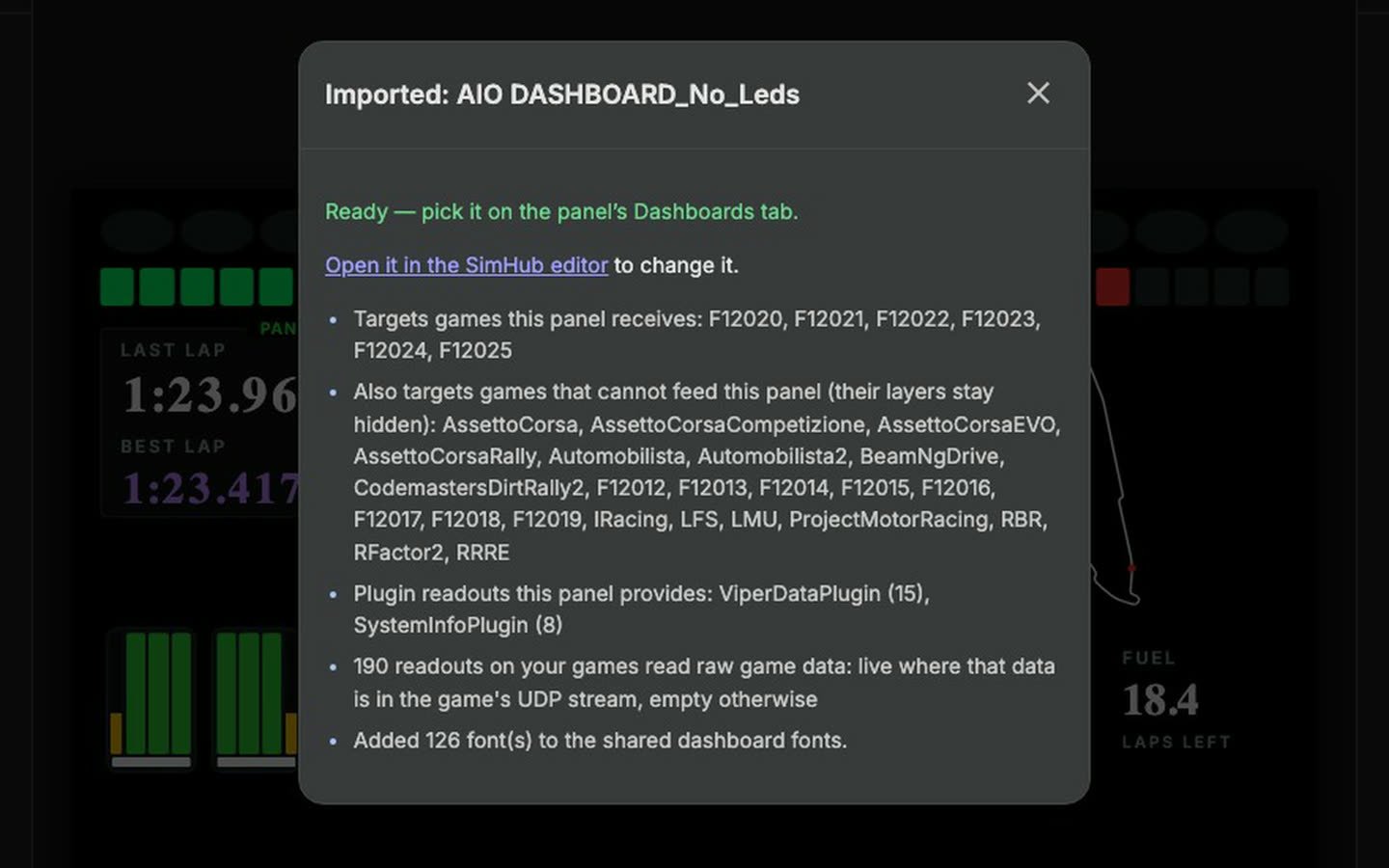
1Import it
Hand the dashboard designer the file, from any browser. The report says what came across: the games it covers, the readouts it uses, the fonts it brought.
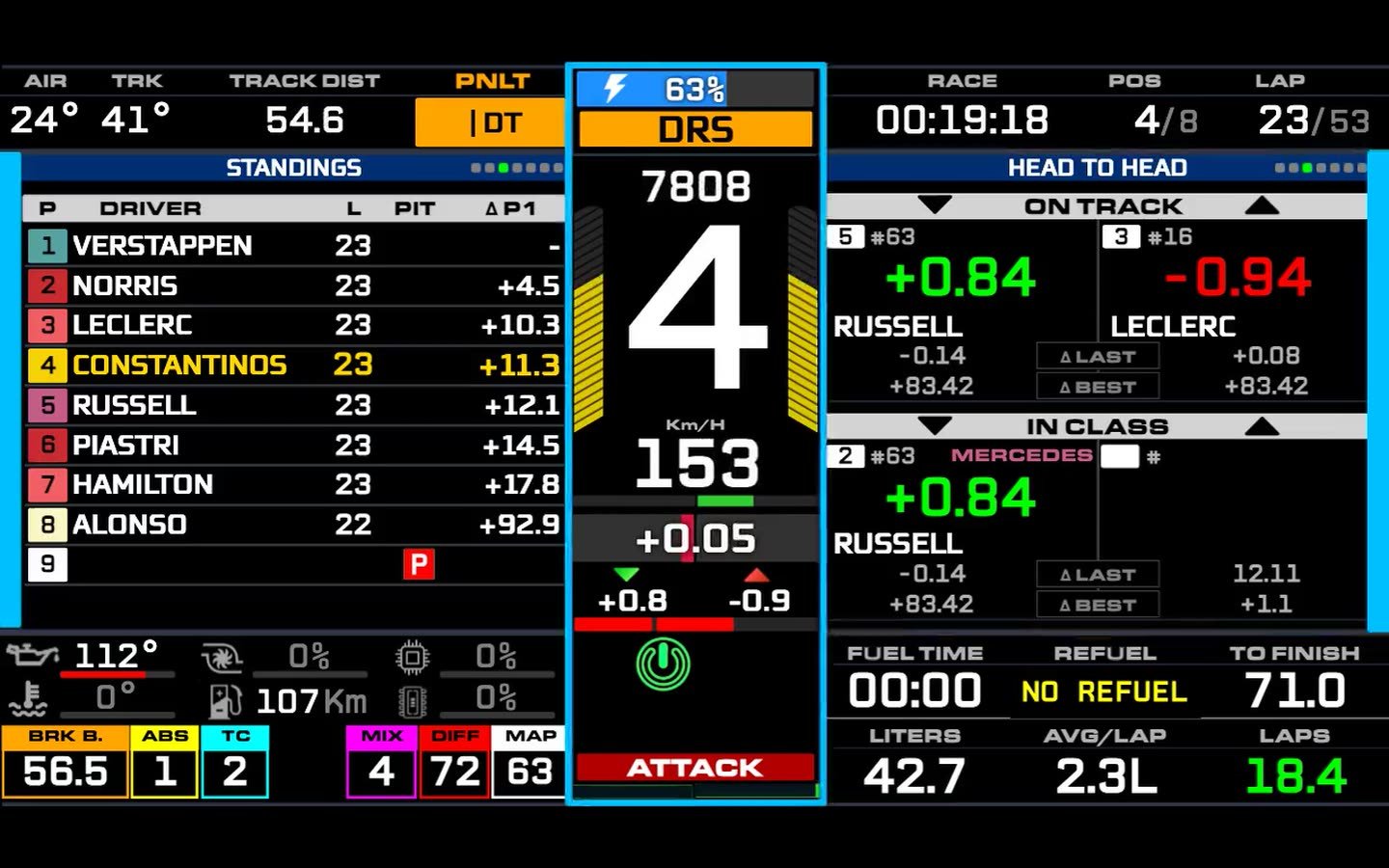
2Pick it on the DDU
It runs on the DDU itself, every screen, page and formula. Tap a panel to page it, swipe for the next screen.
Imported dashboard: AIO by TheKingM249
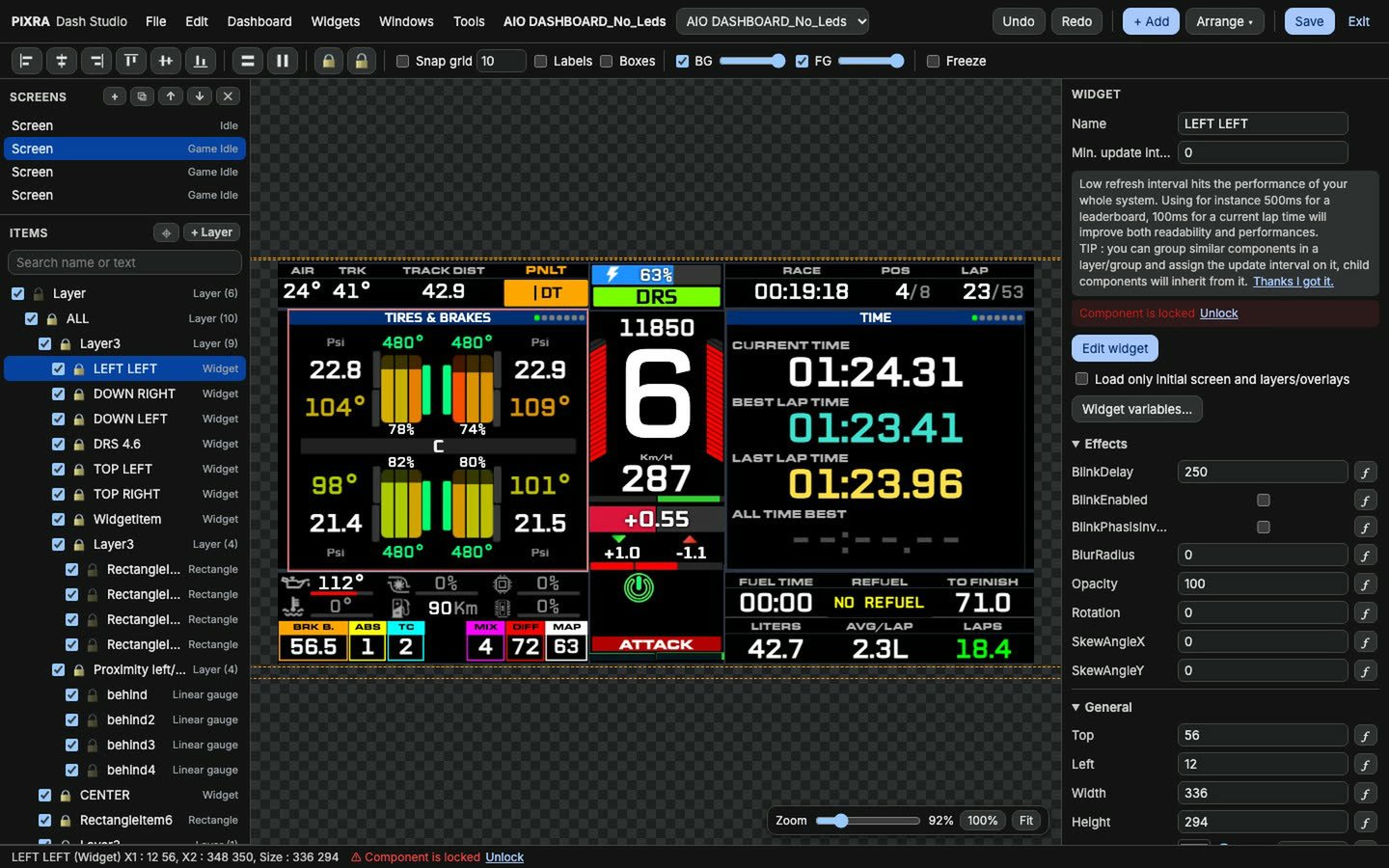
3Change it in the browser
Open it in the editor: screens, layers, widgets, bindings and formulas. Save, and it's on the DDU.
01 · Pixra DDU
A real race display, not a phone in a bracket.
A 5-inch capacitive touchscreen with twenty‑one RGB LEDs in an anodised aluminium housing: fifteen rev lights across the top, flag and spotter blocks down each side. Behind the glass a Radxa Zero 3W (quad‑core 1.6 GHz, 1 GB RAM, 8 GB storage) runs Pixra OS and draws the dashboard itself, at 60 frames a second, from the game's telemetry.
- Design dashboards in a browser by drag and drop, or import the
.simhubdashyou already race with. - Track maps it learns from your own laps, so every circuit works from lap two.
- Multi-screen dashboards: swipe for the next screen, tap a panel to page it.
- Updates itself over the air. Rolls back on its own if an update fails.
- Display
- VoCore 5.0" IPS, 800 × 480, multi‑touch
- Brain
- Radxa Zero 3W + ESP32‑C3 radio
- Compute
- Quad‑core 1.6 GHz, 1 GB RAM, 8 GB storage
- Software
- Pixra OS
- Telemetry in
- UDP over Wi‑Fi, auto‑detects the game
- Updates
- Over the air, with automatic rollback
Inside the DDU
Scroll to open it up.
The actual CAD, not an illustration. Anodised housing, the VoCore panel, an LED bar PCB with its own ESP32‑C3 talking to the accessories, a Radxa Zero 3W on its back doing the drawing, and a fan so it never throttles mid‑race.
Accessories
Add the rest of the rig, one piece at a time.
Each one pairs to the DDU once and takes its orders over the DDU's own radio link, never through your router. Start with the display and add these whenever you like.
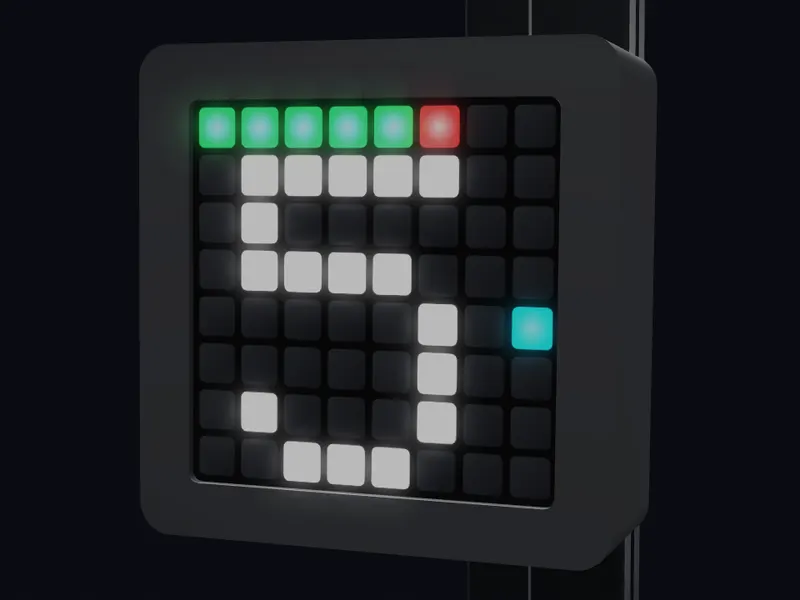 LED MatrixFlags, gear and warnings on an 8 × 8 panel you mount where you look.US$49 early‑bird
 Seat ShakerEngine, shifts, kerbs and lock‑ups through your seat. BST‑2 bought separately.US$89 early‑bird
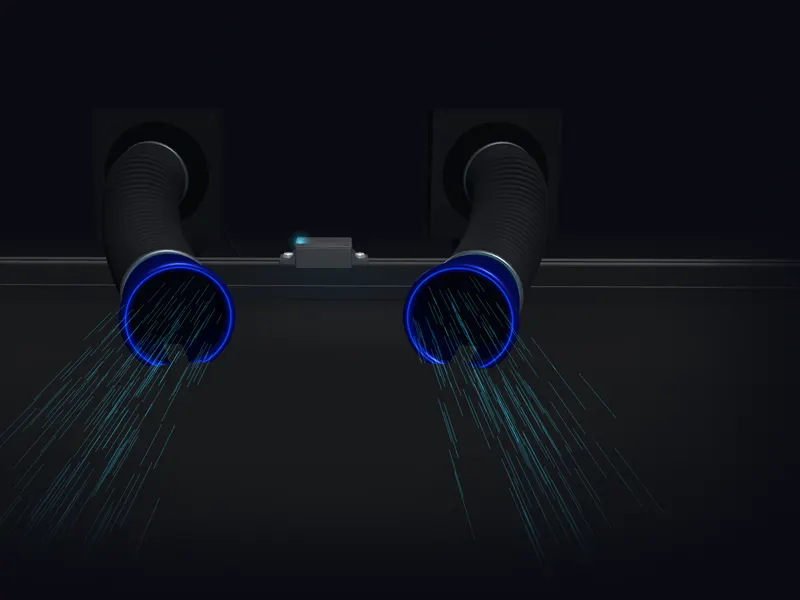 Wind SimulatorSpeed on your face, corner‑aware left and right.US$149 early‑bird
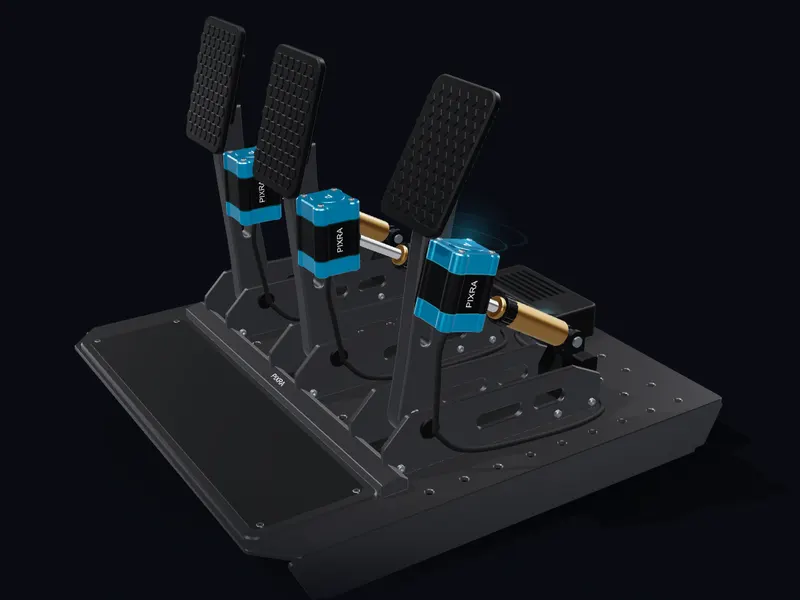 Pedal ShakersABS, traction and shifts through clutch, brake and throttle.US$109 early‑bird
02 · Pixra LED Matrix
Flags, gear and warnings, big enough to see without looking.
An 8 × 8 wireless pixel panel you mount wherever your eyes already go. Yellow flag, blue flag, pit limiter, the gear you're in: the DDU renders every frame and the matrix just shows it.
- Design what it shows, per game and per condition, in the same browser designer.
- Wireless. Pair it once from the DDU and it sits anywhere on the rig, 5 – 15 ms behind it.
- Add a second or third one. No extra setup, they announce themselves.
- Blanks itself within half a second if the feed ever drops, so a stale flag never sits on your rig.
- Pixels
- 8 × 8 WS2812B matrix on an ESP32‑C3
- Link
- ESP‑NOW to the DDU, 5 – 15 ms
- Pairing
- Bluetooth from the DDU, once
- Power
- USB‑C, 5 V
03 · Pixra Seat Shaker
Feel the engine, the shift, and the lock‑up.
A Dayton BST‑2 bass shaker on our own printed saddle, bolted to your seat frame's 40 × 40 rail with two T‑nuts (two saddles clamp a round seat tube instead), with its amp and radio in a printed case bolted to the same rail. Driven by tones the DDU synthesises from the telemetry, the same family of effects PC racers get from ShakeIt, with no PC in the loop.
Bring your own BST‑2. The transducer isn't in the box: it's heavy and magnetic, so shipping one costs more than the US$35 – 40 it sells for locally. Everything else is.
- Engine rumble that climbs with revs. A thump on every gear change.
- Wheel lock, road texture, kerb impacts, braking and lateral G.
- Tune every effect from your phone. Test tone included.
- Transducer
- Dayton BST‑2 (bought separately), 35 W, TPA3116 class‑D amp
- Range
- 10 – 50 Hz, ESP32‑C3 tone synth, 4 tones per channel
- Link
- ESP‑NOW to the DDU, 5 – 15 ms · 60 Hz effects
- Safety
- Goes silent 1 s after the feed stops
Right now 42.0 Hz 64 %
04 · Pixra Wind Simulator
Speed you can feel on your face.
Two blower fans on flexible ducts, so the outlets sit exactly where you want them. Wind rises with speed, and the inside duct eases off through corners, so a fast left feels different from a fast right.
- Speed-proportional, learns each car's top speed as you drive.
- Corner-aware left / right channels.
- Silent 25 kHz fan control. Your response curve, drawn by hand.
- Fans
- 2 × 120 mm, 110 CFM, ducted (up to 3 per unit)
- Controller
- ESP32‑C3, 30 Hz updates, in a case that bolts to 40 mm profile
- Link
- ESP‑NOW to the DDU, 5 – 15 ms
- Power
- One 12 V adapter runs the fans and the controller
Right now L 48 % R 48 %
05 · Pixra Pedal Shakers
ABS you feel in your right foot, not read on a screen.
A sealed aluminium haptic puck on each pedal arm, one each for clutch, brake and throttle, driven by a hub that pairs to the DDU. Every effect has its own pedal: ABS chatters through the brake, wheelspin and traction control buzz the throttle, and every gear change knocks the clutch. It's the motor haptics PC racers get from SimHub, running on a console.
- ABS, traction control, wheel lock and spin, gear shifts, kerbs and impacts, each routed to the pedal you'd feel it through.
- Optionally keep a pedal quiet until you press it, judged from the game's own pedal inputs. Console included.
- Fits any pedal set: the puck bolts to the arm near the pivot. Two‑pedal sets get brake and throttle.
- Tune from your phone: which pedal feels what, a response curve per pedal, a test tone for each.
- Transducers
- 3 × 44 mm 20 W exciters in 50 mm aluminium pucks
- Range
- 60 – 200 Hz, one tone per pedal, SimHub's motor mix
- Link
- ESP‑NOW to the DDU · 60 Hz effects
- Safety
- Goes silent 1 s after the feed stops
Right now C — B — T —
ESP‑NOW · The link
Every accessory is wireless. None of them go through your router.
The matrix, the shakers and the wind simulator talk to the DDU over ESP‑NOW, a direct radio link between the DDU's own dongle and each unit. No access point, no Wi‑Fi retries, no lag from whoever is streaming in the next room: a frame leaves the DDU and lands on the unit 5 to 15 ms later.
- Pair once, from the DDU. A new unit is found over Bluetooth, handed its settings, and never needs a computer.
- Nothing to configure on your network. The DDU is the only thing on your Wi‑Fi. Change routers and the accessories don't notice.
- Fails safe, fast. The matrix blanks within 0.5 s of silence, the shakers go quiet within 1 s, the fans stop. A stale flag or a rumble with no game behind it never happens.
- Add another. Units announce themselves. A second matrix or a third fan needs no setup at all.
Pixra OS · over‑the‑air updates
It gets better after you buy it.
- The DDU updates itself. New dashboards, new games, new effects: one tap on the Updates page, no SD card, no computer.
- It cannot brick. Updates land in a second slot and the DDU only switches over once the new version has booted and proved itself. If it doesn't, it rolls back on its own.
- Accessories too. The DDU pushes new firmware to every matrix, shaker, pedal and wind simulator unit over the air. You will never plug one into a laptop.
Make it yours
Six designers. Any browser. No install.
Every editor runs on the DDU and opens on your phone or laptop from a QR code on its screen. Change something, it's on the hardware before you've put the phone down.
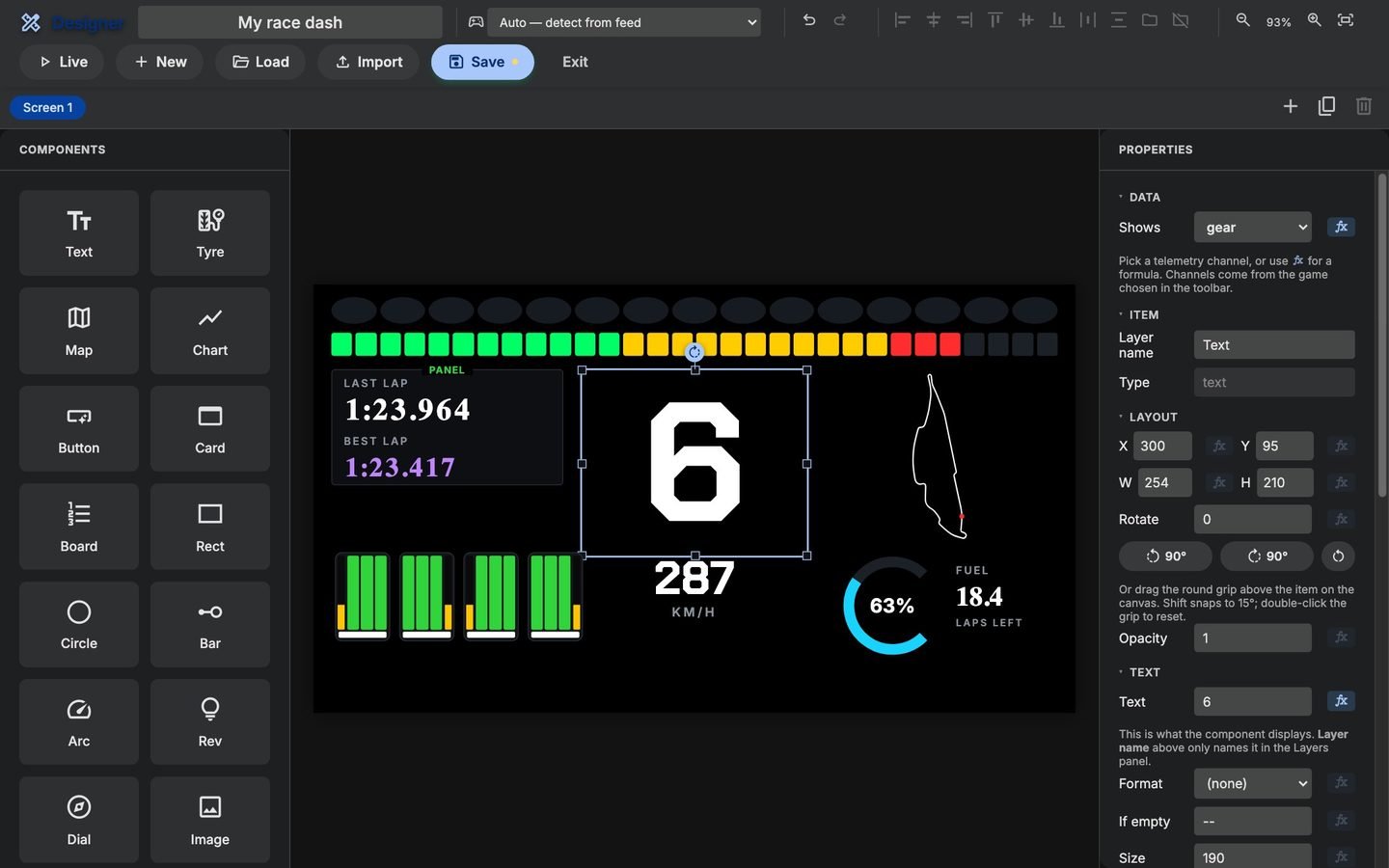
Dashboard designer
Drag text, gauges, rev bars, shift lights, tyres, track maps, charts and standings onto an 854 × 480 canvas that is exactly the DDU's screen. Bind anything to any telemetry channel, or write a formula. Multiple screens per dashboard. Import a .simhubdash and keep the layout you already love.
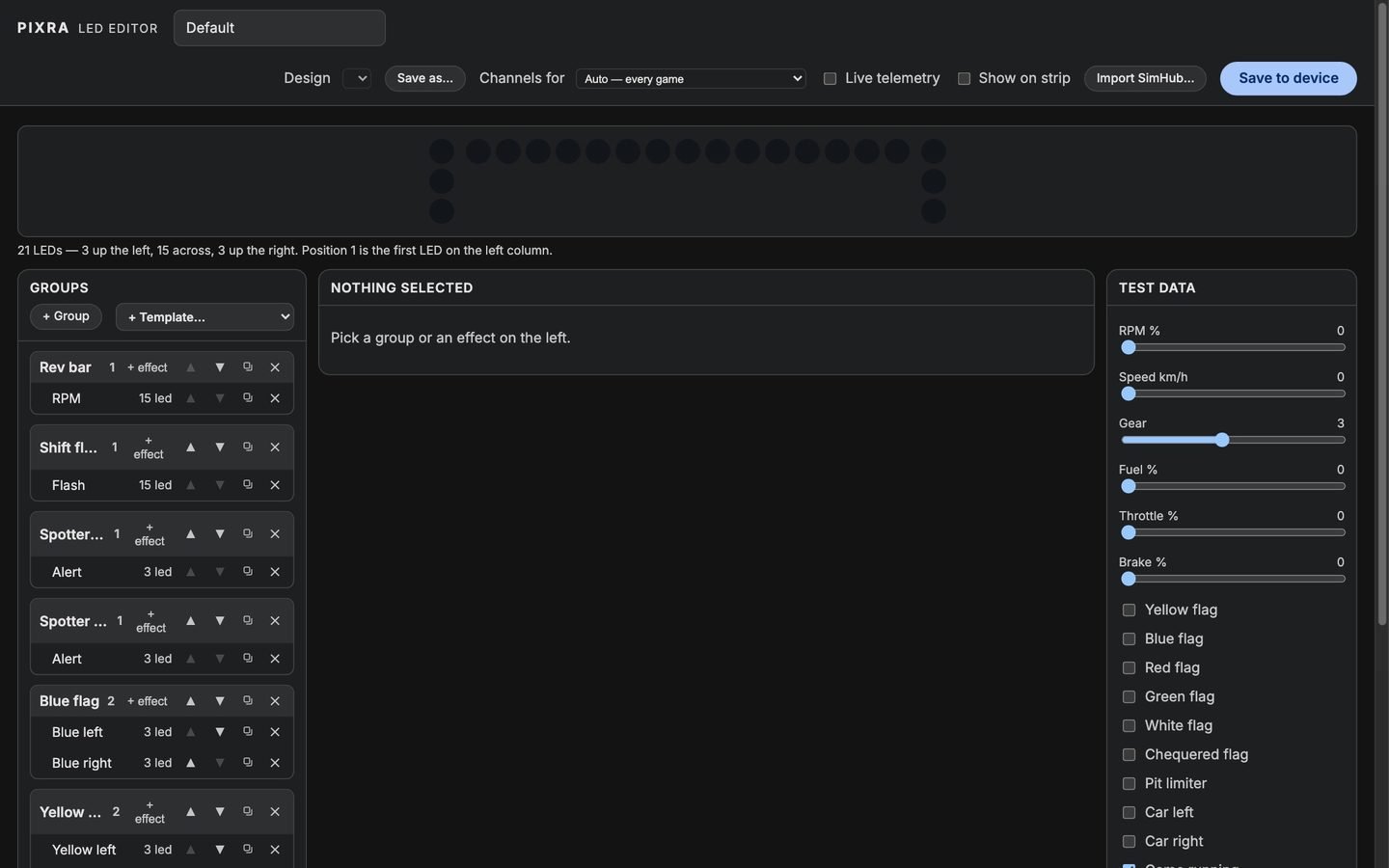
Shift lights
All 21 LEDs, group by group: rev bar colours and thresholds, flags on the end blocks, spotter, pit limiter, blink rates. Test it against sliders before you ever start a game. Imports SimHub LED profiles.
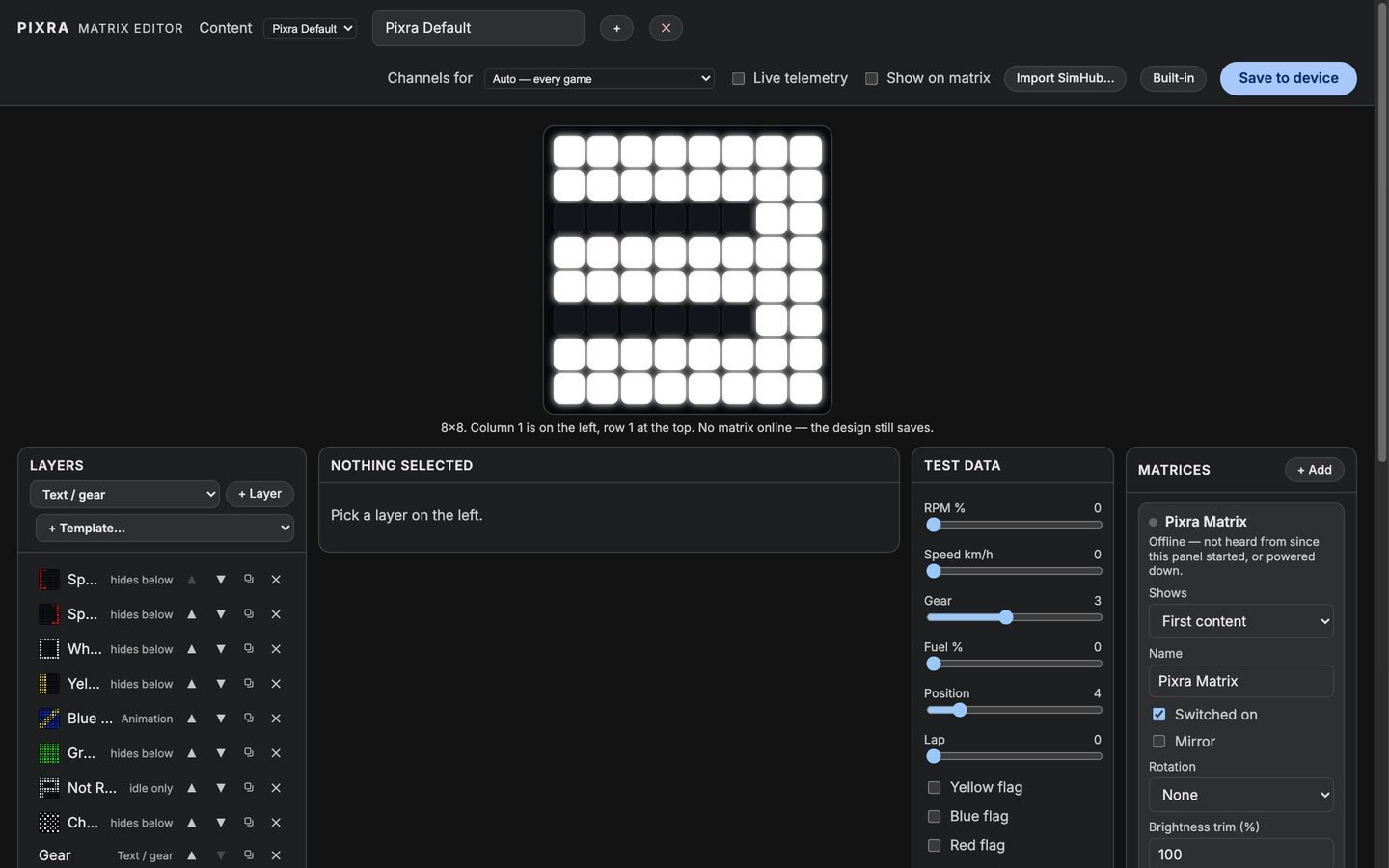
LED matrix
Draw what each unit shows, layer by layer: gear, flags, animations, text that scrolls. Conditions per game, so an F1 blue flag and a Forza one can look different. Live preview on the real unit.
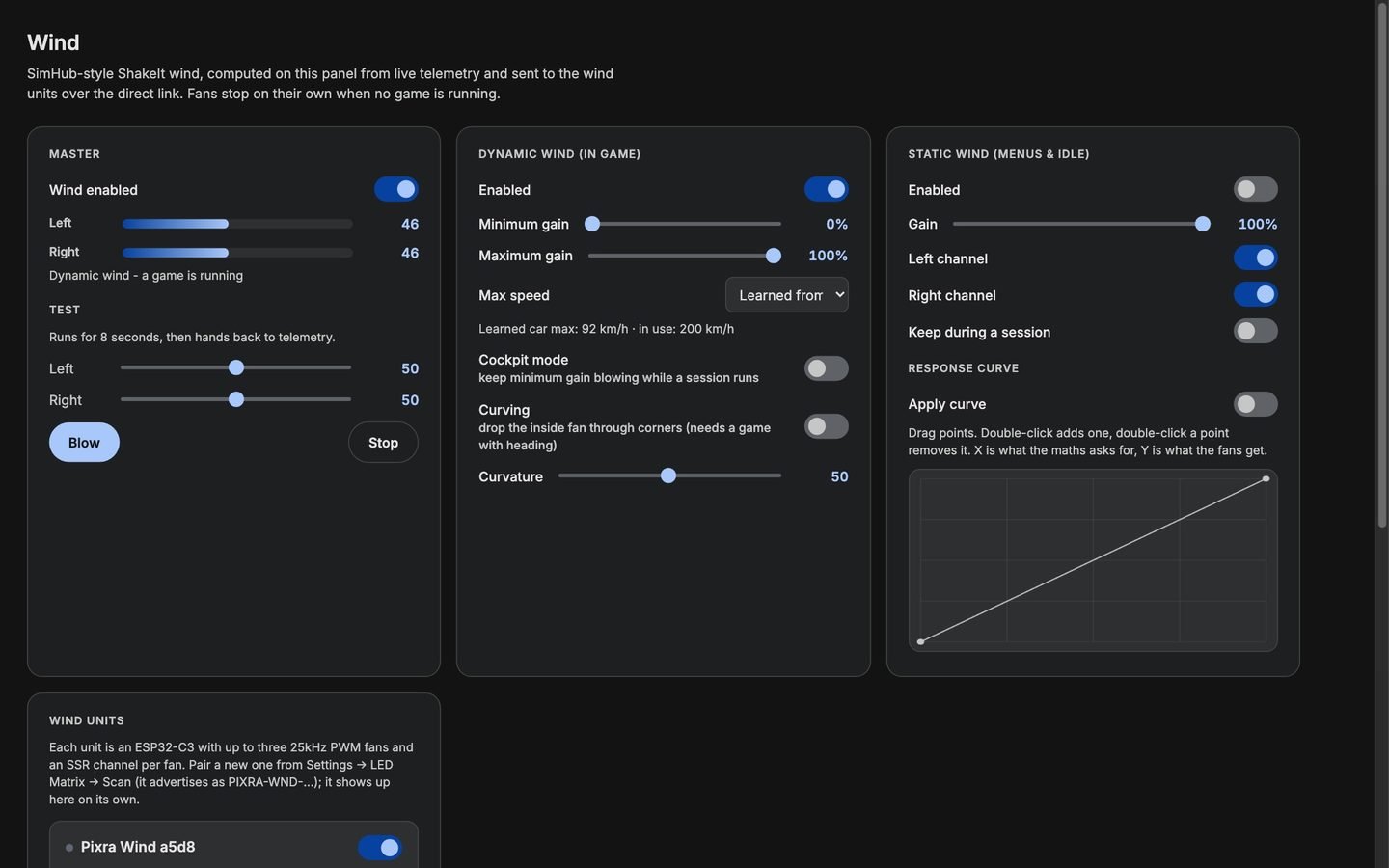
Wind simulator tune
Minimum and maximum gain, the speed the car tops out at (or let it learn), corner curving, static wind for the menus, and a response curve you drag by hand. A test blast for finding the level.
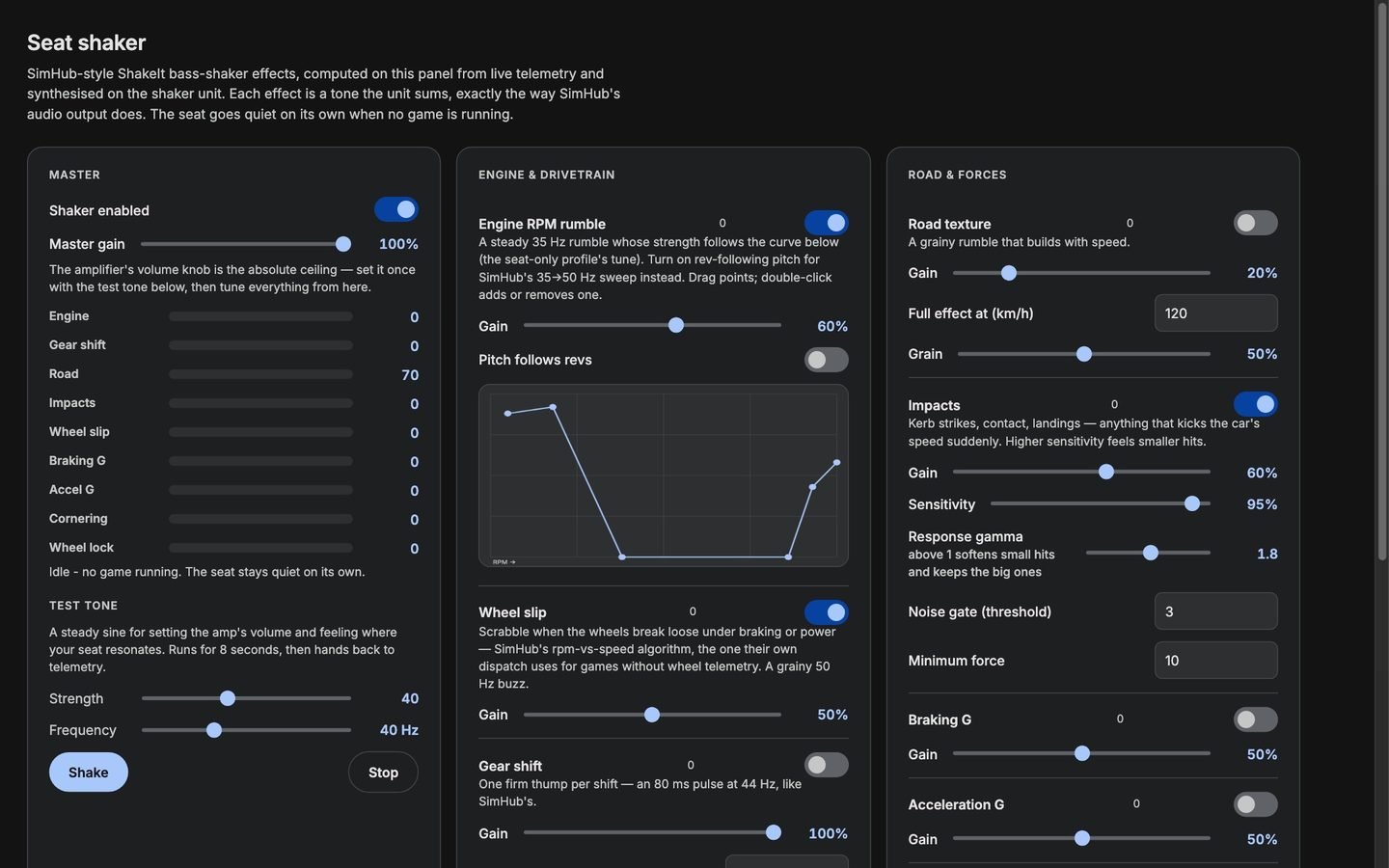
Seat shaker tune
Engine rumble with its own RPM curve, gear shift, road texture, impacts, wheel slip, braking G, acceleration G, cornering: gain and character for each. A test tone to set the amp once.
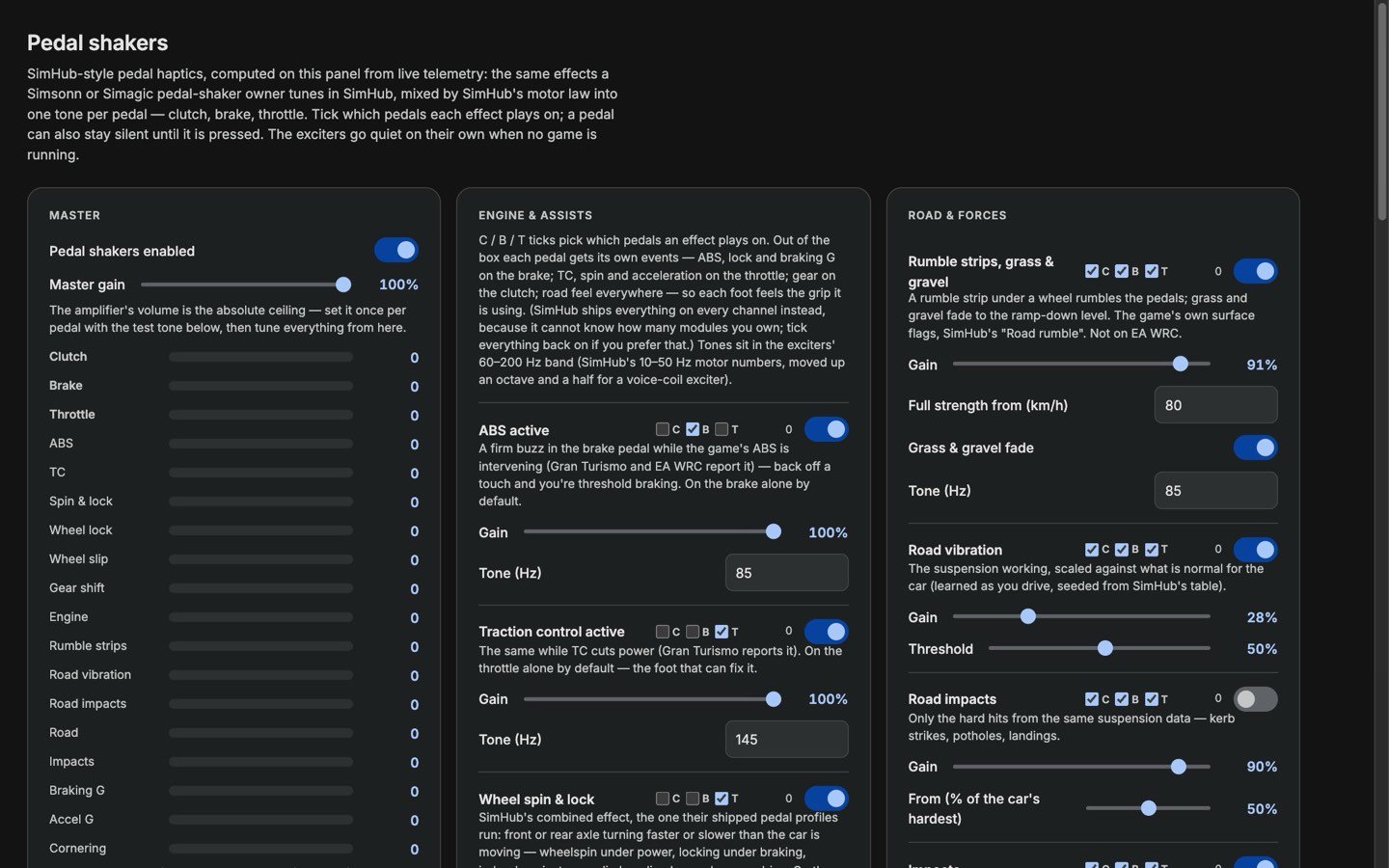
Pedal shakers tune
Every effect with a clutch, brake and throttle tick: choose which pedal feels ABS, traction control, wheelspin, shifts, kerbs. Gain and tone for each, a response curve you drag per pedal, a gate that keeps a pedal quiet until you press it, and a test tone per pedal.
Kickstarter early‑bird
Early‑bird prices.
What the early‑bird tier costs on Kickstarter, in US dollars. The waitlist gets it before it goes public. Start with the DDU, which runs everything, and add the rest whenever you like.
-
Start here
Pixra DDU
US$249
The race display and the brain of the rig: dashboards, shift lights, and every accessory.
- Pixra DDU
- 2 m USB‑C power cable
-
LED Matrix
US$49
Flags, gear and warnings on an 8 × 8 panel you mount wherever you look.
- Pixra LED Matrix
- 2 m USB‑C power cable
-
Seat Shaker
US$89
Engine, shifts, kerbs and lock‑ups through your seat.
- Hub
- Printed mount for the BST‑2
- Power adapter
Dayton BST‑2 not included: about US$35 – 40 locally.
-
Wind Simulator
US$149
Speed on your face, corner‑aware left and right.
- Two ducted 120 mm fans and controller
- Power adapter
-
Pedal Shakers
US$109
ABS, traction and shifts through clutch, brake and throttle.
- Three haptic pucks and their hub
- Pedal mounts
- Power adapter
The whole rig comes to US$545 at early‑bird prices, plus your own BST‑2. Join the waitlist to get the tier first.
Questions
Before you back it.
Do I really need no PC, and no SimHub?
None at all. Your PS5 or Xbox already broadcasts telemetry over your Wi‑Fi; the DDU listens for it, draws the dashboards itself and drives every accessory over its own radio link. There is no computer anywhere in the loop, not even for setup or updates.
Which games and consoles work?
PlayStation 5 and Xbox Series X|S, with EA Sports F1 23 – 26, Gran Turismo 7, Forza Motorsport, Forza Horizon 4, 5 & 6 and EA Sports WRC. The DDU recognises whichever game is running and switches dashboards to match. New games arrive as over‑the‑air updates.
Does it work with my wheel and pedals?
Yes. Pixra never talks to your wheel or pedals: everything comes from the game's own telemetry, so any wheel, base or pedal set works. The pedal shakers bolt to the pedal arms of whatever set you already have, and two‑pedal sets get brake and throttle.
Do the accessories need the DDU?
Yes. The DDU is the brain: it reads the game and decides what every matrix, shaker and fan does, then sends it to them wirelessly. Start with the DDU and add accessories whenever you like; each new one pairs to it once and needs no other setup.
How is it set up?
Turn on UDP telemetry in the game's settings, type your Wi‑Fi password on the DDU's touchscreen, and pair any accessories from the DDU. That is the whole setup. The accessories talk to the DDU directly, not through your router, so a busy home network never adds lag.
Can I change what it shows and how it feels?
Everything. Six designers run on the DDU and open in any browser on your phone or laptop: dashboards (import a .simhubdash you already love), shift lights, the LED matrix, the wind simulator, the seat shaker and the pedal shakers. Changes land on the hardware as you make them.
What is Pixra OS?
The operating system on the DDU. It recognises the game, draws the dashboards, works out what every accessory does and sends it to them, and hosts the six designers you open from your phone. It is the part a PC running SimHub plays on other rigs, living on the display itself, and it is what the over‑the‑air updates improve.
Will it keep getting better?
Yes. The DDU updates itself over the air with one tap, and pushes new firmware to every accessory the same way. An update lands in a second slot and the DDU only switches once it has booted and proved itself, so a failed update rolls back on its own.
When does it ship, and what will it cost?
Backers get their units 45 – 60 days after the campaign ends. Early‑bird prices are US$249 for the DDU, US$49 for the LED Matrix, US$89 for the Seat Shaker, US$149 for the Wind Simulator and US$109 for the Pedal Shakers, and the waitlist gets that tier before it goes public. What's in each box.
Why do I buy the BST‑2 myself?
The Dayton BST‑2 is heavy and magnetic, which makes it expensive to ship around the world: buying one locally, for about US$35 – 40, costs you less than having it in the box. Everything it needs is included: the hub, the printed mount and the power adapter.
What powers each unit?
The DDU and the LED Matrix run on USB‑C and come with a 2 m USB‑C cable. The Seat Shaker, the Wind Simulator and the Pedal Shakers each come with their own power adapter.
What happens to my email?
We use it to tell you when the Kickstarter goes live and to offer you the early‑bird tier. Nothing else: no newsletter, no spam, and it is never shared or sold. The privacy notice has the detail, and contact@pixraracing.com takes you off the list.
Kickstarter
Be first on the grid.
The prototypes are finished: the DDU, matrix, seat shaker and wind simulator on this page are running hardware, not a render of a plan, and the pedal shakers are on the bench now. Kickstarter is next, and backers get their units 45 – 60 days after the campaign ends. Waitlist members get the early‑bird tier before it goes public, and nothing else — no newsletter, no spam.
- PrototypesFinished. DDU, matrix, shaker and wind simulator all on the rig.
- KickstarterLaunching soon. Waitlist gets the early‑bird tier first.
- Shipping45 – 60 days after the campaign ends.